Federate Class
To aid in making of new Python-based federates and to provide a common integration point for some of the CoSim Toolbox (CST) functionality, a Federate class has been created. The class has been defined in such a way that, for many simple federates, it will be largely useable as-is, though some degree of customization is always required. Like all programming with classes, to customize the Federate class code, it is expected that the developer will sub-class the CST Federate class and then overload the necessary functions. In some cases you’ll want to call the Federate class code first and then add customization, in other cases you’ll want to scrap all of a particular method and do your own thing. Its common that some of the customization will involve doing something different with HELICS and thus learning more about HELICS and its APIs.
If you’re new to classes and sub-classing has you confused, there are a lot of resources online for getting up to speed. Here’s a website pretty comprehensively covering it and a YouTube playlist doing the same.
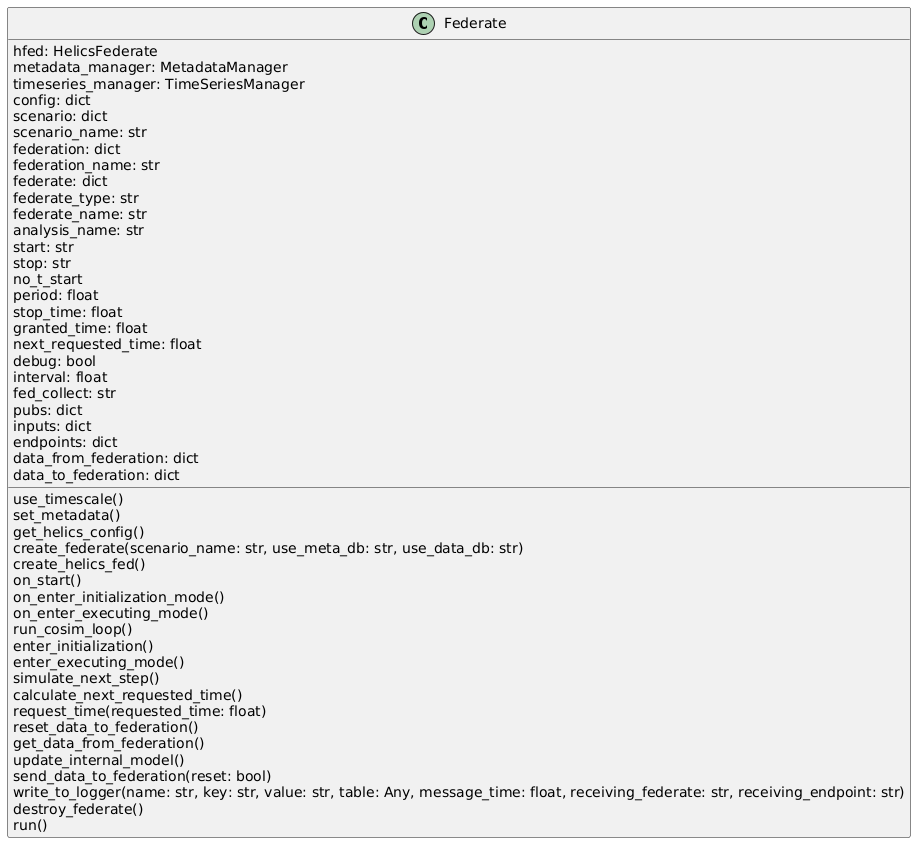
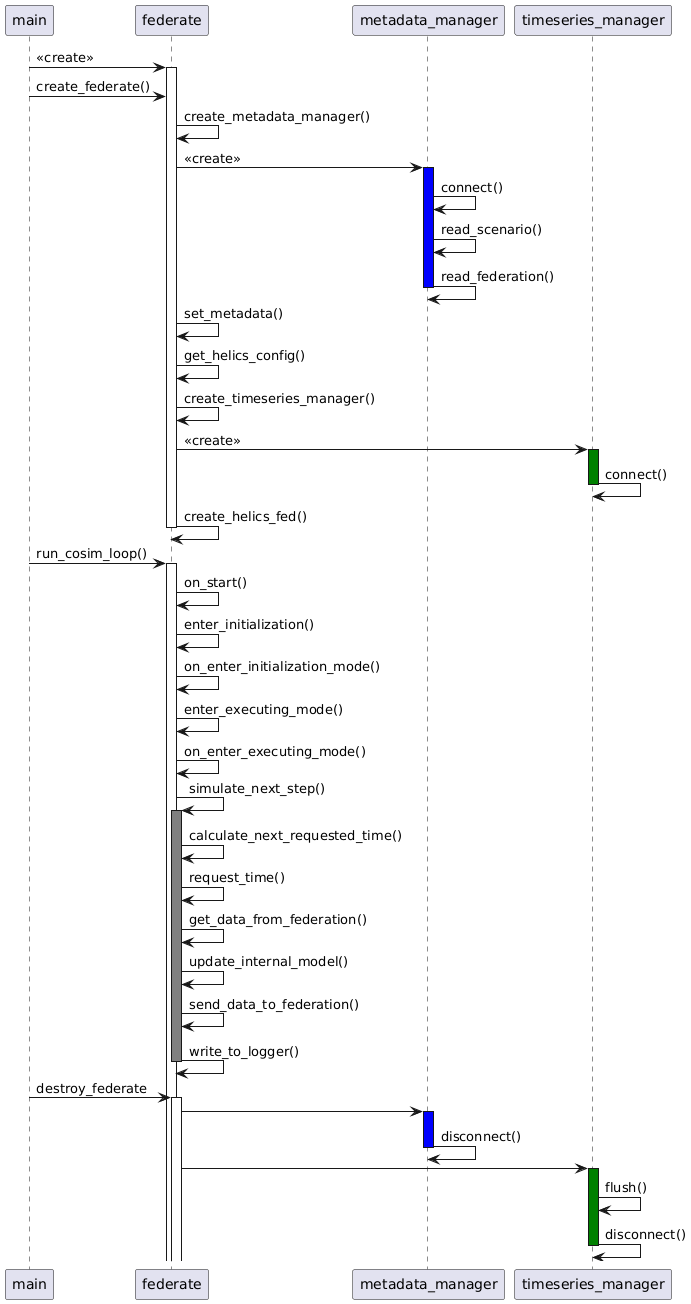
As a reference, the class diagram and sequence diagram is shown below that shows the methods of the class and their default use. As shown in the sequence diagram, there are only four methods that need to be called by the code that is creating the CST federate:
Federate(federate_name)- creates the CST federate objectcreate_federate(scenario_name)- initializes the CST and HELICS federate objectsrun_cosim_loop()- Runs the main co-simulation loopdestroy_federate()- Cleans up after the completion of the co-simulation
There is one method that must be overloaded: update_internal_model(). If you only read one more thing on this page, read that section below.
Class Diagram
Sequence Diagram
Federate class methods
Most of the class methods below are effectively internal APIs that most modelers will not have a reason to call. Seeing what they are doing, though, is helpful in understanding how HELICS federates operate in general and how this class implements that functionality.
create_federate()
Alot goes into getting a CST ‘federate’ stood up and this method takes care of it all. First, the method connects to the metadata database using the URI and database name and, among other things, pulls down the HELICS configuration information. The “publications”, “subscriptions”, “inputs” and “endpoints” attribute dictionaries are then populated with the names, keys, and destinations in the HELICS config file. Lastly, the HELICS federate itself is created. What follows are the details of the methods called in create_federate()
connect_to_metadataDB() or connect_to_metadataJSON()
Both of these methods gather the configuration metadata needed to create the ‘federate’. In the first case a connection is made to the metadata database to pull this information down. Alternatively, the configuration information can be read from a local configuration file. In either case, the same configuration schema is used and is defined as in the “Configuration Schema” reference document.
The JSON/dictionary that is pulled in is stored in the federation attribute.
set_metadata()
Pulls in start and stop time strings in the configuration information and converts them to Python datetime data types. Also defines the analysis name and whether the CST Logger needs to collect its outputs for publication.
get_helics_config()
This method looks at the “federation” attribute to define a few HELICS-specific attributes of this federate: name (federate name), federate_type (HELICS federate type, i.e. value, message or combo), period (size of timestep), and config (comprehensive HELICS configuration).
connect_to_dataDB or connect_to_dataCSV()
Depending on whether the time-series database is being used to collect data from the ‘federate’ (indicated by the use_data_db attribute, defined when this ‘federate’ was instantiated), one of these methods is used to set up the output data collection.
If the time-series database is being used (use_data_db set to True), a check is made to determine if the existing analysis name is used in the time-series database. If it doesn’t, appropriate database structures are instantiated. See the page on the time-series database under the hood for further details.
If the output data is being written to a CSV file than that file is created and opened for writing.
create_helics_fed()
Calls the necessary HELICS API to create the HELICS federate object (stored as the hfed attribute) using the config attribute defined when get_helics_config() was called. To make any HELICS API calls such as might be done when overloading other methods, this HELICS object must exist; overload this method with care to ensure said object is retained.
run_cosim_loop()
This method starts the main co-simulation loop where a time request is made, (when granted a simulation time) data is pulled in from the federation and made available to the core simulation logic (the “internal model” of the ‘federate’) which then utilizes this data to execute that logic and then finally publishes new data out to the federation. Each of these steps (and a few not mentioned) have their own methods that can be overloaded as necessary; further details follow
enter_initialization()
Prior to simulation time zero, HELICS federates have a chance to initialize themselves which can include multiple data exchanges with other federates. This initialization generally requires coordination between federates and thus, in the general case implemented here, no initialization is really made and the HELICS API to enter initialization is simply called. This method is one that could be easily overloaded to change federate behavior.
enter_executing_mode()
After initialization (if any), a HELICS federate requests time zero by entering executing mode. The implementation in this method simply makes the direct HELICS API call to do so. This method is one that could be easily overloaded to change federate behavior.
simulate_next_time_step()
Once the ‘federate’ has been granted time zero, the main co-simulation loop starts where time requests are made and granted, data is pulled in from the federation, the federates internal model is updated, and new values are pushed out to the rest of the federation. This method is the main loop that calls the methods that execute those functions. It is unlikely this method will need to be overloaded as it contains the very general update_internal_model() which must be overloaded and thus can be made to execute any arbitrary user code. Never say “never”, though.
calculate_next_requested_time()
Determining the time to request in the main co-simulation loop is highly dependent on the function of the ‘federate’. Some federates are designed to advance through simulated time in a very regular fashion (e.g. fixed time step size) others change their time step size based on the output of their internal model and others rely on changing inputs (as determined by HELICS) to be granted a new time. This method assumes a fixed simulation step size and does the simple math of calculating the next simulation time based on the current simulation time and the value in the period attribute for this object. This method is one that could be easily overloaded to change federate behavior to calculate a more customized and better-suited simulation time.
request_time()
Using the output of calculate_next_requested_time(), the request for the next simulation time is made in this method. In many analysis, the federation simply moves through simulated time though in other cases, iteration at some or all timesteps is required. This method implements the simple, former case but if the later case with iteration is needed or an asynchronous time request is needed, this method can easily be overloaded and those more complex methods can be implemented.
get_data_from_federation()
This method simply makes the HELICS API calls necessary to get the inputs and messages from the federation this federate has received and stores them in a dictionary (“data_from_federation”). This method saves the user of this class from the bookkeeping and having to learn the (not too complicated) HELICS APIs. There could be a reason to overload this method but one is not springing quickly to mind so probably not?
Data previously stored in the dictionary is erased before being updated to ensure the values are only from the latest granted simulation time. Data is accessed using the name of the HELICS subscription or endpoint as the key in the dictionary. The format of the value being sent out from each publication or endpoint is as follows:
pubs: value of data type as defined for this input
endpoints: value is a dictionary
    {
        "sending endpoint": "<sending endpoint name>",
        "payload": "<data received>"
    }
update_internal_model()
OK, this method must be overloaded; if you don’t CST throws an error. This is where all the non-co-simulation stuff of the federate takes place; this is where all the logic and functionality the federate provides in the co-simulation is executed. If this federate is a thermostat, this is where the logic to determine whether to turn the HVAC system off or on is implemented. If this federate exists to solve a fluid dynamics problem, this is where all those fun differential equations are solved.
Generally, this method will start by getting current values provided by the rest of the federation by reading the data_from_federation dictionary. This dictionary holds the latest values of all defined HELICS inputs and endpoints which have (presumably) been defined because they are needed to correctly perform this federate’s functionality. The names of the data are the names the federation knows the data by and may or may not well-match the internal variable names. The public federation names of the data are defined by the sending federates in their HELICS configuration JSONs (in the “publication” and “endpoint” sections.)
After reading these inputs and assigning them to appropriate variables in the internal model (i.e. variables in the thermostat or fluid dynamics equations or whatever functionality your federate provides), the core logic of the federate is executed. This logic provides whatever functionality the federate provides to the rest of the federation and often involves solving equations.
After this logic is executed and any relevant equations are solved, the outputs this provides to the federation need to be assigned. To do this, the process is the inverse of getting the data from the federation: the variables from the solved equations that hold the relevant keys need to be assigned to the appropriate keys in the data_to_federation dictionary. The names in this dictionary are the those defined for “publications” and “endpoints” in this federate’s HELICS configuration JSON.
Though this assignment is generally the final step in this method, it doesn’t have to be. For example, clean-up activities after solving equations may be needed or logging diagnostic messages or writing something to file may still need to take place.
send_data_to_federation()
Like get_data_from_federation(), this method takes the data in the dictionary and sends it out to the rest of the federation via HELICS. This is mostly tedious work, and it is unlikely this method will need to be overloaded. See the API documentation to see how to format the output value depending on whether the output in question is a publication or endpoint.
Data is sent using the name of the HELICS subscription or endpoint as the key in the dictionary. The format of the value associated with this key is as follows:
pubs: value of data type as defined for this input
endpoints: value is a dictionary
    {
        "sending endpoint": "<sending endpoint name>",
        "payload": "<data received>"
    }
destroy_federate()
After “run_cosim_loop()” has reached the terminal simulation time (as indicated in the object attribute “stop_time”), that loop exits and this method is called. Though not strictly necessary, this method does the clean-up work to exit the co-simulation cleanly and avoid generating any nuisance warning messages.